> ## Documentation Index
> Fetch the complete documentation index at: https://juo.io/docs/llms.txt
> Use this file to discover all available pages before exploring further.
# Klaviyo
Juo provides out-of-the box email notifications for subscription purchase, renewal,
upcoming payment, failed payment, cancellation, and pending renewal (items out of
stock).
In addition to these automatic notifications, or instead of them, merchants can also integrate Juo with Klaviyo to manage their subscription-related communication there.
Before using Klaviyo integration, [enable it in the Juo settings](/enable-klaviyo-integration).
## Juo \<> Klaviyo Flow triggers
Juo is currently syncing the following events with Klaviyo:
| Event name | Sent when |
| :----------------------------------------- | :----------------------------------------------------------------------------------- |
| **Started Subscription** | Subscription is purchased |
| **Paused Subscription** | Subscription is paused |
| **Skipped Subscription** | Subscription is skipped |
| **Renewed Now Subscription** | Subscription is triggered using the Renew Now option |
| **Reactivated Subscription** | Subscription is reactivated from the Canceled status |
| **Replaced Line Subscription** | A product is swapped |
| **Line Added Subscription** | A product is added to subscription, as recurring or as one-time |
| **Line Removed Subscription** | A product is removed from subscription |
| **Next Billing Date Updated Subscription** | Next billing date is changed |
| **Plan Changed Subscription** | Subscription delivery frequency is changed |
| **Plan Changed Subscription Line** | Product delivery frequency is changed |
| **Cancelled Subscription** | Subscription is cancelled |
| **Failed Subscription** | Subscription has failed e.g. because of too many failed payment attempts |
| **Upcoming Renewal Subscription** | 3 days before a subscription is scheduled to renew |
| **Billed Subscription** | Subscription is successfully paid |
| **Billing Failed Subscription** | Subscription payment fails |
| **Renewal Requires Action** | Payment requires additional authentication (e.g. 3D Secure for credit card payments) |
| **Product Out Of Stock Subscription** | Subscription renewal fails due to one or more products being out of stock |
| **Chargeback Subscription** | Chargeback request is initiated by the customer |
Note that in order to sync events between Juo and Klaviyo you need to turn on
the integration first. Events that happened prior to the integration will not
be visible in Klaviyo.
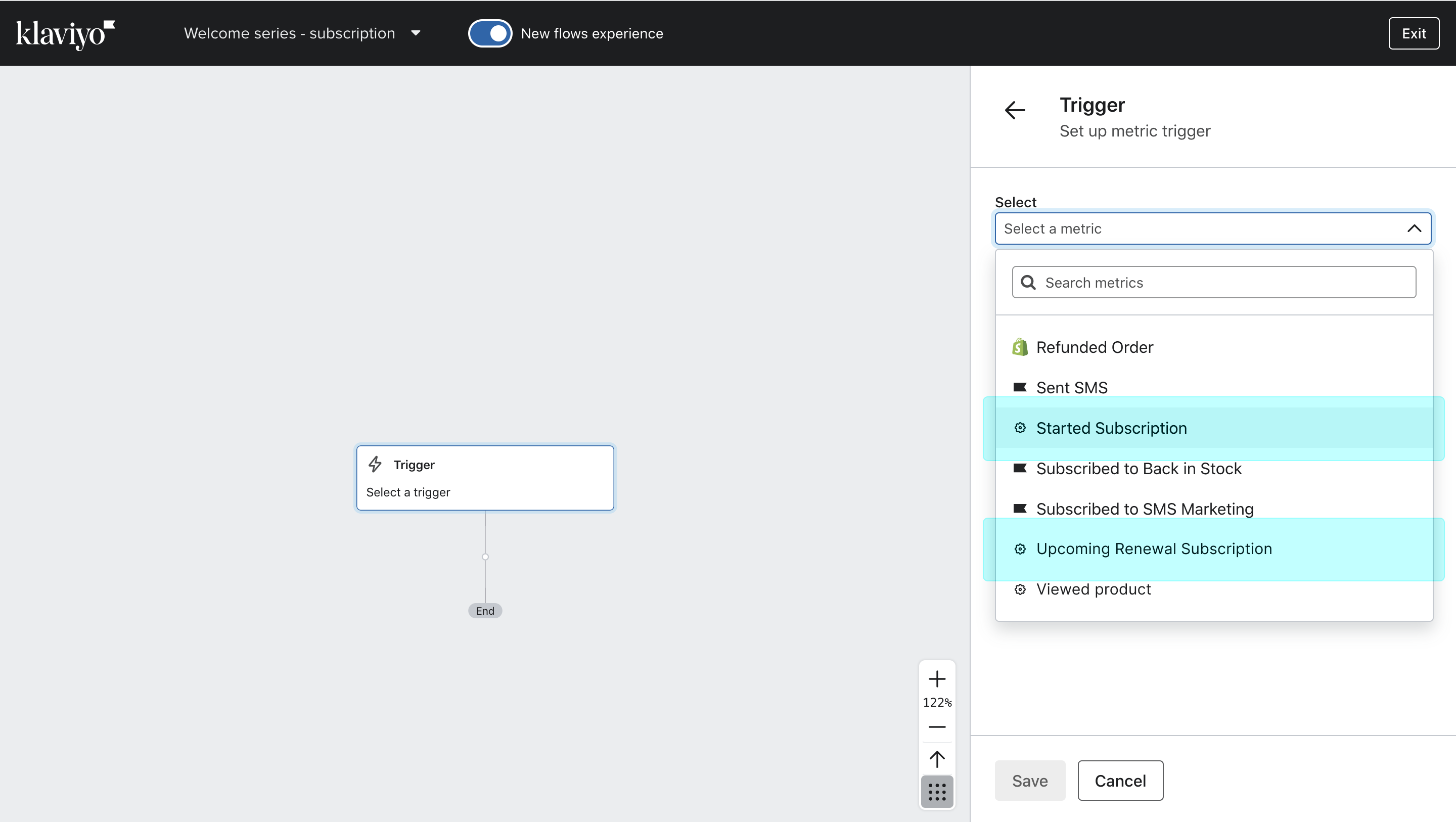
You can use the above events as triggers to send subscription notifications. For example, if you want to send an email after a subscription has been purchased in your store, select “Subscription started” as a trigger.
## Customer tags as flow filters
Apart from events that act as triggers, you can also use tags to limit the email flow to specific subscriber segments.
Juo automatically tags subscription and membership customers with different tags, depending on the type of subscription, its status, and the number of subscription orders.
#### Tags assigned to subscription customers:
Note that these tags are configurable in the Juo admin panel's [general
settings](https://admin.shopify.com/apps/juo-subscriptions/settings/general),
so always refer to your current setup.
**Status tags:**
| Tag name | Description |
| :------------------------ | :----------------------------------------------------------- |
| **active\_subscriber** | Customer with active subscription |
| **paused\_subscriber** | Customer with paused subscription |
| **cancelled\_subscriber** | Customer with cancelled subscription |
| **failed\_subscriber** | Customer with failed subscription payment |
| **expired\_subscriber** | Customer whose subscription auto-expired due to its schedule |
**Loyalty tags:**
| Tag name | Description |
| :------------------------ | :------------------------------------------------ |
| **new\_subscriber** | Customer with only first subscription order |
| **recurring\_subscriber** | Customer with renewed subscription |
| **returning\_subscriber** | Customer with at least two separate subscriptions |
**Membership tags:**
| Tag name | Description |
| :----------------------- | :------------------------------------ |
| **membership\_active** | Customers with an active membership |
| **membership\_inactive** | Customers with an inactive membership |
A subscriber will only have one tag per tag group assigned at any give time.
#### Tags assigned to potential subscribers
Based on their order history, customers can also be assigned the **subscription\_intent** tag, which allows merchants to convert them to subscribers more easily with targeted messaging.
[Subscription intent tagging](/guides/using-global-settings#subscription-intent) is a PRO feature that can be enabled under **Settings** > **Subscription intent**.
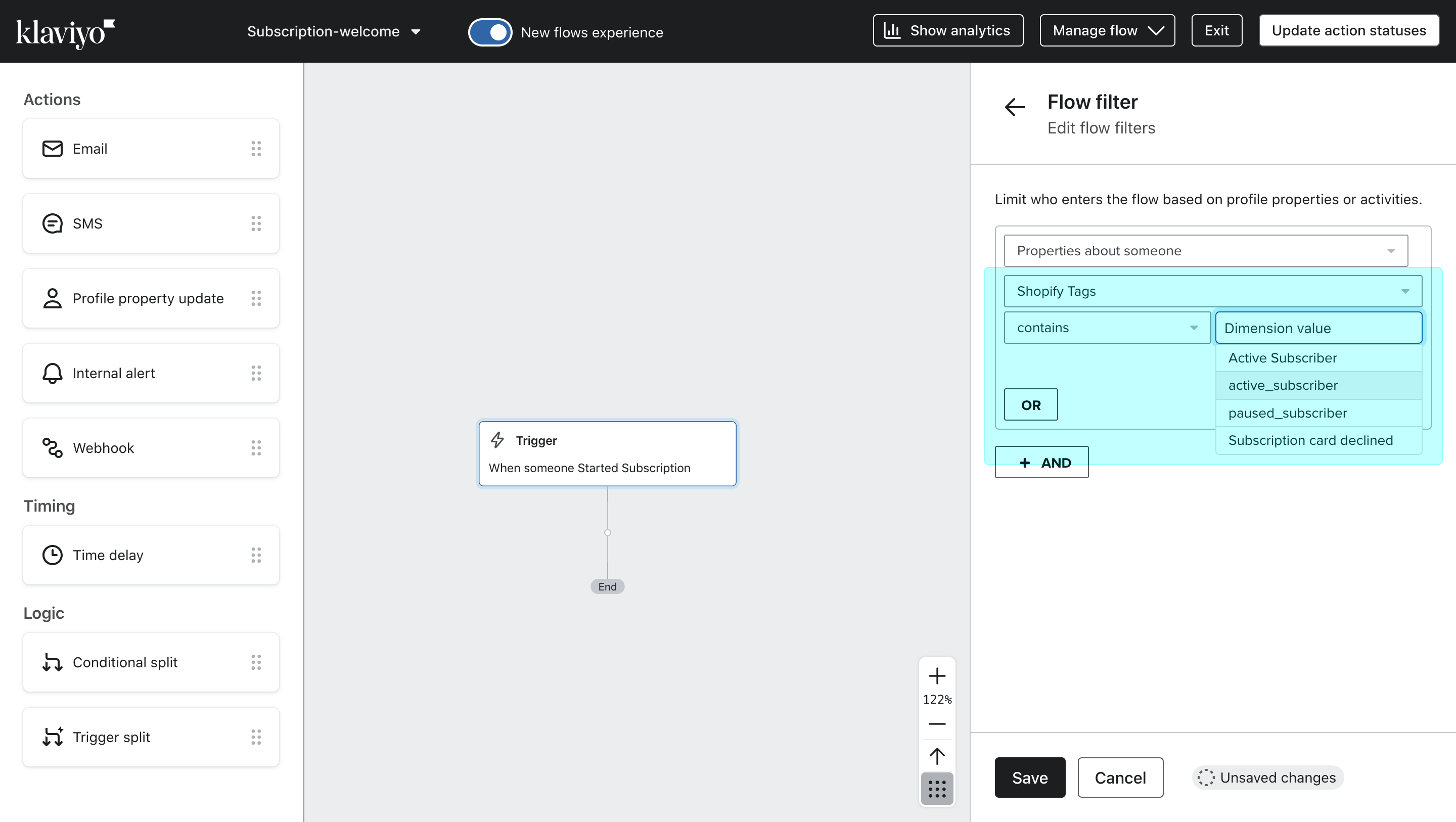
All the above tags can be used as flow filters in Klaviyo — they can be found under **Flow filter** > **Properties about someone** > **Shopify Tags**.
## Juo \<> Klaviyo Event properties
Each of the events that is synced between Juo and Klaviyo comes with a set of properties that can be used as dynamic variables in the email and SMS notifications set up in Klaviyo.
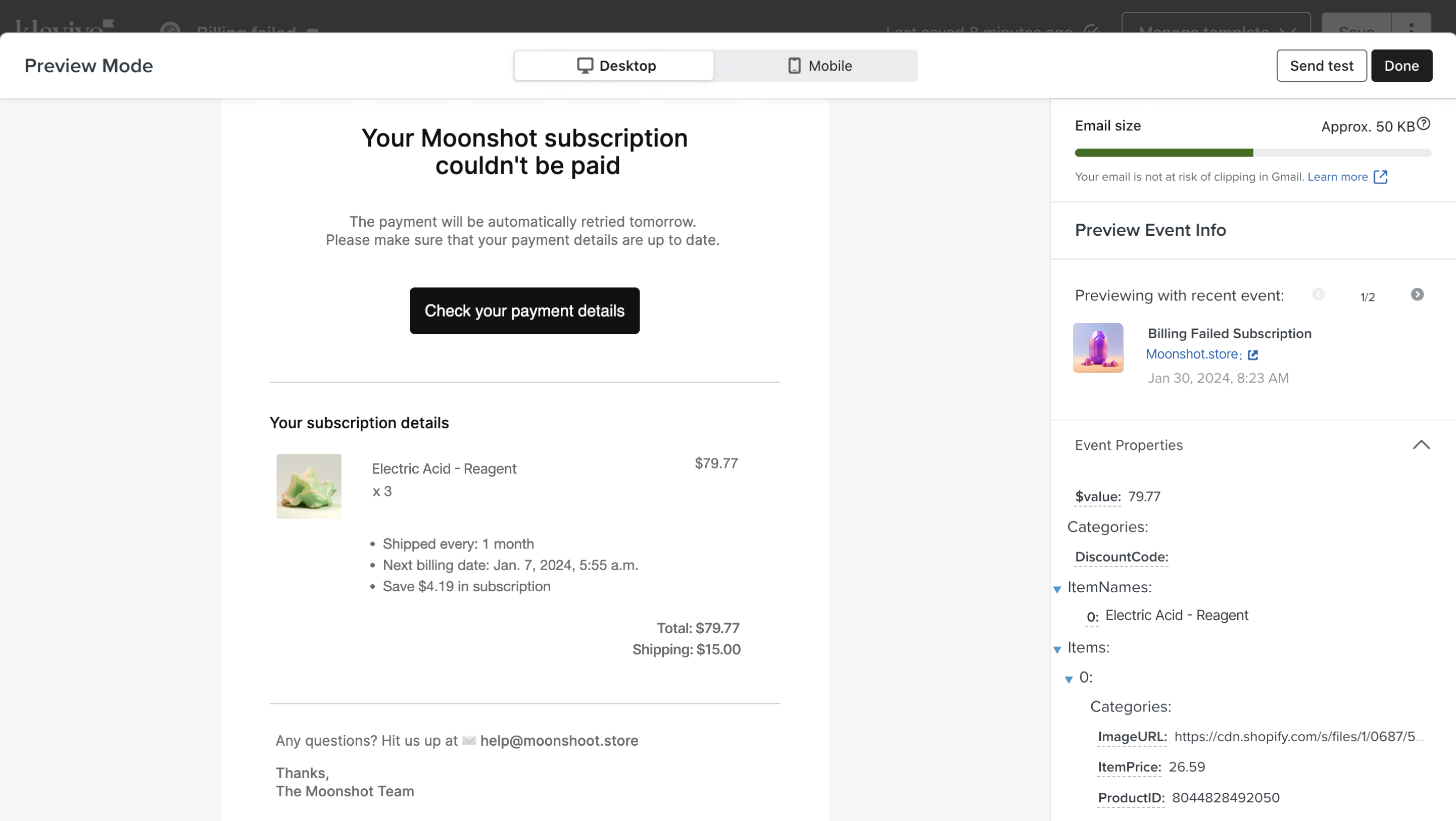
To access the properties that are available for each event, you need to add an Email action in Klaviyo and switch from the content editor to the **preview mode** as you set up the content. You can copy the properties from the preview back into the text fields in the content.
### Subscription-related properties
| Property name | Description | Type |
| :------------------------- | :---------------------------------------------------------------------- | :----- |
| **OrderID** | ID of the subscription | number |
| **Items** | List of products in the subscription | array |
| **ItemNames** | List of product names in the subscription | array |
| **DiscountCode** | Discount code applied to the subscription | string |
| **DiscountValue** | Numeric value of the discount | number |
| **OrderIntervalFrequency** | Numeric value of the frequency index, e.g. `1` for every 1 month | number |
| **OrderIntervalUnit** | Type of interval unit, e.g. `week` or `month` | string |
| **CurrentCycle** | Index number of the current subscription order. 0 is the initial order. | number |
| **NextBillingDate** | Date of the next scheduled renewal, e.g. `"2025-04-28T11:07:23.000Z"` | string |
| **Saving** | Total savings in subscription | number |
| **ShippingCost** | Shipping cost of the next subscription renewal | number |
| **\$value** | Total order value (without shipping) | number |
Depending on the event type, some additional properties may become available, such as:
| Property name | Description | Type |
| :--------------------- | :-------------------------------------------------------------------------------------------- | :----- |
| **errorMessage** | Provides more background on the reason for payment failure, e.g. "Payment method was revoked" | string |
| **NextActionUrl** | Link to where subscribers can finish their payment validation when required | string |
| **PaymentMethodType** | Payment method type for upcoming renewal notifications (`recurring` or `intentional`) | string |
| **CancellationReason** | Reason for cancelling the subscription provided by the customer | string |
| **reasonCode** | Chargeback reason code, e.g. `"MS02"` | string |
| **reasonMessage** | Chargeback reason, e.g. `"Refusal by the Debtor"` | string |
| **attempt** | Contains the number of the failed billing attempt | number |
### Customer-related properties
| Property name | Description | Type |
| :------------------------------- | :------------------------------------------------------------------- | :------ |
| **ActiveSubscriber** | Indicates whether the customer has at least one active subscription | boolean |
| **ActiveSubscriptionIDs** | List of IDs of the customer's active Juo subscriptions | array |
| **ActiveSubscriptionVariantIDs** | List of Shopify variant IDs included in the customer's subscriptions | array |
| **NextReplenishmentDate** | Date of the next scheduled billing for any active subscription | string |
| **ShopifyTags** | List of tags assigned to the customer in Shopify | array |
| **TotalRecurringOrders** | Total number of subscription-based orders placed by the customer | number |
| **TotalRecurringRevenue** | Total revenue generated from all of the customer's subscriptions | number |
### Item-related properties
| Property name | Description | Type |
| :-------------- | :-------------------------------------------------------------- | :----- |
| **ProductID** | Allows to display the ID of the product in subscription | string |
| **ProductName** | Shows the name of the product | string |
| **VariantName** | Shows the name of the variant | string |
| **Quantity** | Shows the product quantity | number |
| **ItemPrice** | Shows the price per single item | number |
| **RowTotal** | Shows the price of all items of the same type (Item x Quantity) | number |
| **ImageURL** | Allows to display the product image | string |
| **Categories** | Shows the collection or collections to which an item belongs | array |
Here’s an example of how you can use properties to display additional subscription information in each email, including:
* products ordered
* product quantity
* total price for the products
* subscription benefits
* total item and shipping value
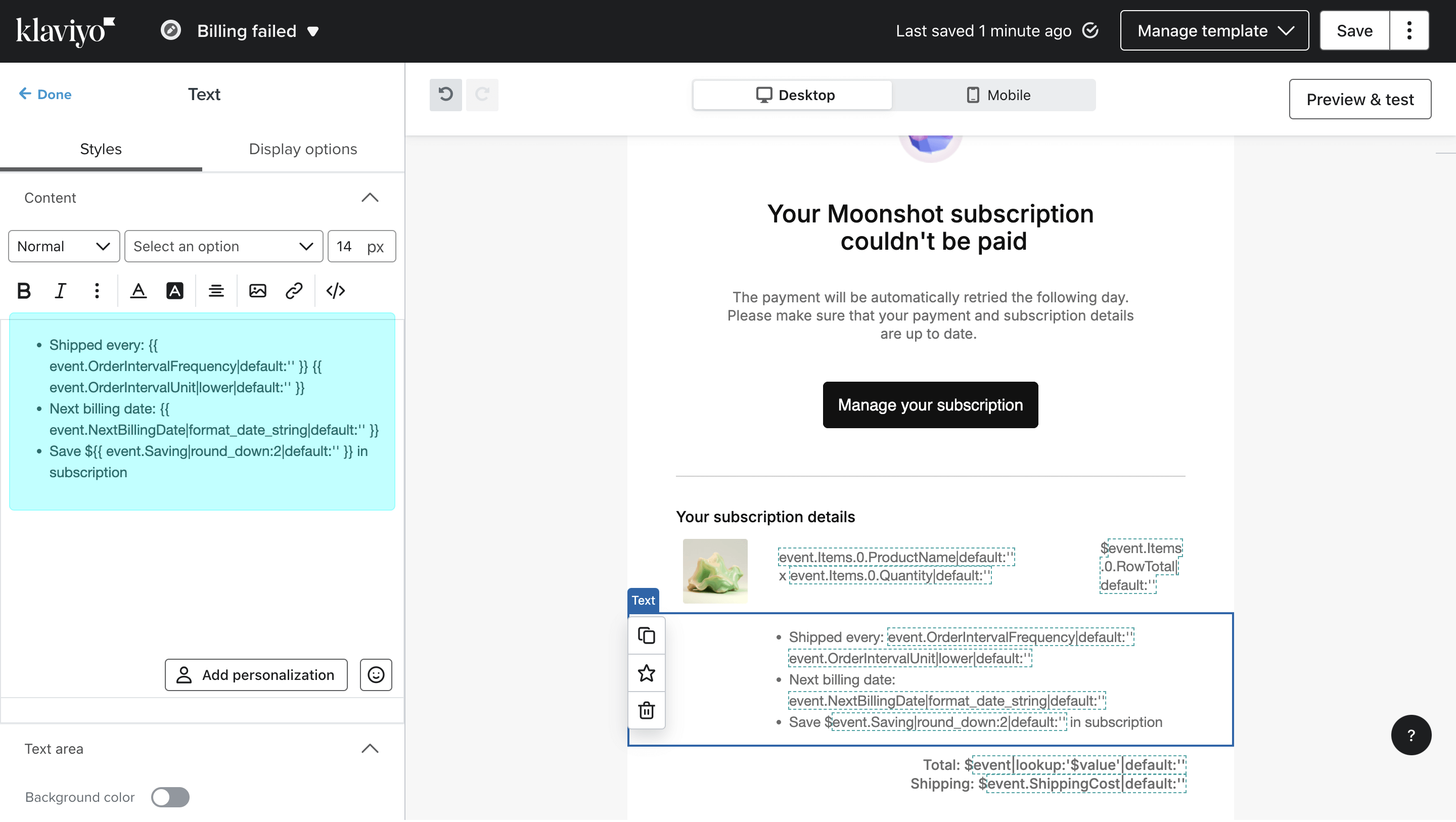
Properties for displaying subscription details
```
**Your subscription details**
{{ event.Items.0.ProductName|default:'' }}
x {{ event.Items.0.Quantity|default:'' }}
${{ event.Items.0.RowTotal|default:'' }}
- Shipped every: {{ event.OrderIntervalFrequency|default:'' }} {{ event.OrderIntervalUnit|lower|default:'' }}
- Next billing date: {{ event.NextBillingDate|format_date_string|default:'' }}
- Save ${{ event.Saving|round_down:2|default:'' }} in subscription
Total: ${{ event|lookup:'$value'|default:'' }}
Shipping: ${{ event.ShippingCost|default:'' }}
```
Feel free to copy them into the Klaviyo email editor as you set up the content.
Switching to the preview mode next, you can check how the subscription order information is doing to be displayed in your notifications.