> ## Documentation Index
> Fetch the complete documentation index at: https://juo.io/docs/llms.txt
> Use this file to discover all available pages before exploring further.
# Workflows overview
Workflows is a powerful tool to **automate subscription experiences and customer journeys**. Create automated flows that respond to customer actions and subscription events. Use them to reduce churn, recover failed payments, upsell products, reward loyal customers, reduce tickets and manual work, and more.
# Getting started with workflows
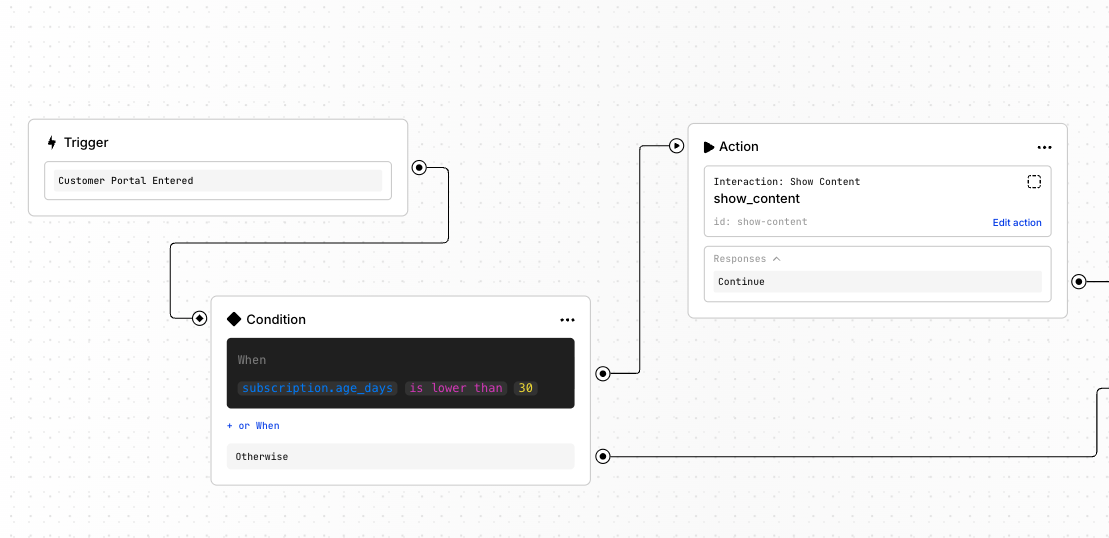
Workflows come with a visual builder where you create desired logic by connecting nodes using the following logic structure:
**Trigger →** (optional) **Conditions → Actions**
* ⚡ **Triggers** are events that **start a workflow**.
* 🔀 **Conditions** define **how the workflow should continue**.
* ▶️ **Actions** define **what the workflow does**.
# How to build a workflow
To build a workflow, go to **Admin Panel → Workflows**.
* Create a new workflow and add a starting **[trigger](/workflows/triggers)**
* Add an **[action](/workflows/actions)** or a **[condition](/workflows/conditions)**
* Branch the flow with more **actions** and **conditions** according to your needs
* Finalize each path by adding an `End` node
Use the sidebar to customize each element. Interactions can be further customized visually by clicking [**Preview in Editor**](/editor).
**Triggers** begin every workflow. **Conditions** and **actions** can be lined up freely to create complex, personalized automations.
## Next steps
* See [Use cases](/workflows/guides/cancellation-flow) for starter workflows you can adapt
* Use the technical reference for [Triggers](/workflows/triggers), [Conditions](/workflows/conditions), and [Actions](/workflows/actions)