

- Understand cancellation reasons.
- Retain subscribers by:
- Explaining the value of your product.
- Highlighting the benefits of being a subscriber.
- Addressing their specific needs.
Workflow setup
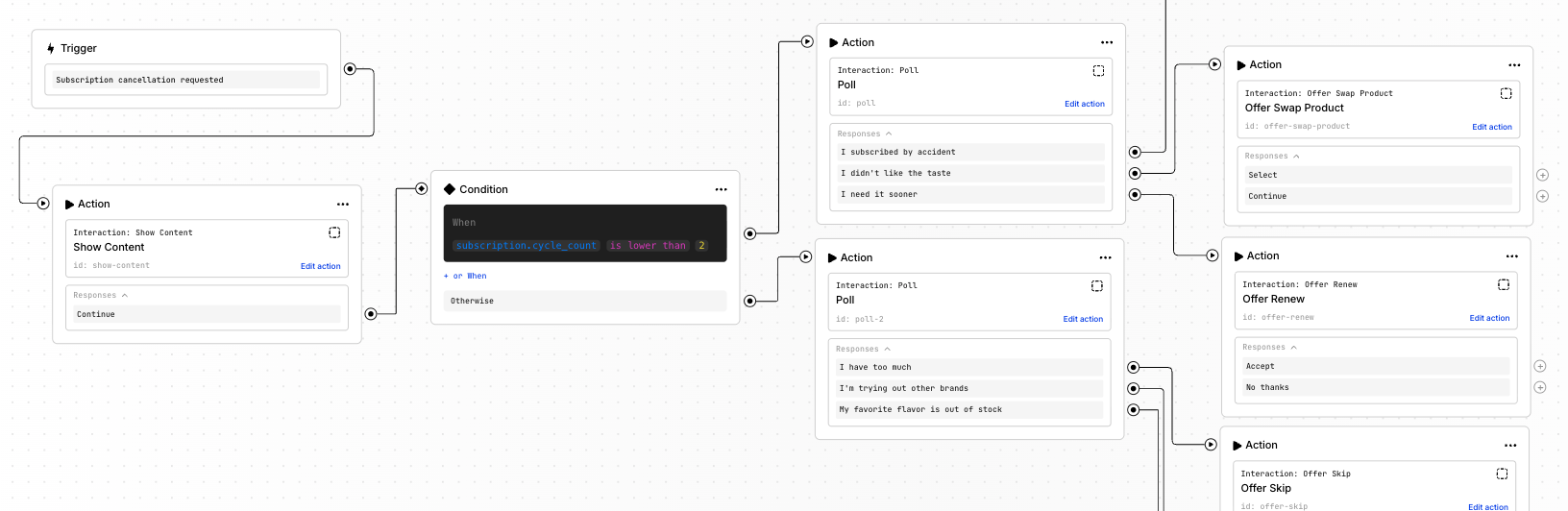 Trigger: Subscription cancellation requested
The default outcome of a workflow started by this trigger is subscription cancellation. This means the customer must accept some offer; otherwise, the flow will result in their subscription being canceled. Most offers have a specific effect, such as adding a discount or free product, skipping an order, swapping a product, etc.
Use the
Trigger: Subscription cancellation requested
The default outcome of a workflow started by this trigger is subscription cancellation. This means the customer must accept some offer; otherwise, the flow will result in their subscription being canceled. Most offers have a specific effect, such as adding a discount or free product, skipping an order, swapping a product, etc.
Use the Custom offer action to present content and encourage subscribers to stay without applying a specific system action.
Useful actions:
- Show content: Explain the value of your brand, product, and subscription. This can contain an image or a video.
- Poll: Learn the exact reason for canceling.
- Offer alternatives: Depending on the poll response, offer a discount, free product, product swap, frequency change, delayed order, etc., as an alternative to canceling.
- Custom offer: Show content and provide an option to stay without accepting a specific offer.
Best practices
Explain the value of your product and subscription
Before offering subscribers discounts and free products, make sure they understand the value of your subscription and the benefits of consistent use. Emphasizing product value often encourages long-term retention more effectively than immediate incentives. Consider discounts as a secondary measure rather than the core of your retention strategy.Personalize for new vs. long-term subscribers
Long-term subscribers typically have different reasons for canceling compared to recent subscribers. Asking a new subscriber if they have stocked on too much product is likely irrelevant. Instead, present them with educational content on how to use the product or reiterate its long-term value—information that would be less necessary for someone who has already been subscribed for a year. Useful conditions:subscription.cycle_countsubscription.age_days
Personalize by subscribed product
You can create tailored routes for people subscribed to a specific product. Maybe it’s your flagship subscription-first product, or maybe it’s a brand-new release that you’d like to get feedback on. Use the condition below in the workflow to check for a specific product variant:subscription.items contains item where variantId is equal to